How to Convert HTML to JSX in React
If you are learning React, one of the first challenges you will face is converting regular HTML into JSX. At first glance, JSX looks almost identical to HTML, but several important differences can cause errors if you simply copy and paste HTML directly into a React component.
If you've ever copied HTML into a React component and immediately seen errors, you're not alone. Most developers run into this problem when they first start working with React. Small differences such asclassName, htmlFor, and self-closing tags can quickly turn a simple copy-paste task into a debugging session.
In this guide, you will learn exactly how to convert HTML into valid React JSX, understand the most common mistakes, and see practical examples you can apply immediately in your projects.
When I first started learning React, I assumed I could copy HTML from a static website directly into a component. Within seconds, VS Code was showing errors everywhere. After fixing the same issues repeatedly, I built this HTML to JSX Converter to speed up the process and help other developers avoid the same frustration.
Table of Contents
Jump to any section
Quick Answer
Key changes required when converting HTML to JSX
What Is JSX?
JSX stands for JavaScript XML. It is a syntax extension that allows developers to write HTML-like markup directly inside JavaScript files. React uses JSX because it makes components easier to read and maintain.
Although JSX looks similar to HTML, it is not actually HTML. JSX is transformed into JavaScript during the build process, which is why certain HTML attributes must be renamed and why JSX follows stricter syntax rules than standard HTML.
I made this mistake myself when learning React. JSX looks almost exactly like HTML, so it's easy to assume you can paste HTML directly into a component and call it a day. In reality, React expects a few syntax changes before the code becomes valid JSX.
Why Convert HTML to JSX?
Modern React applications are built using reusable components. Components use JSX to describe what should appear on the screen. Because of this, any existing HTML template must be converted into JSX before it can be used inside a React component.
Common situations where developers need HTML to JSX conversion include:
- Migrating a static website to React
- Converting Bootstrap templates into React components
- Moving HTML snippets into Next.js applications
- Building reusable UI components
- Using designs exported from website builders
HTML vs JSX: Key Differences
Before converting markup, it is important to understand the biggest differences between HTML and JSX.
| HTML | JSX | Reason |
|---|---|---|
| class | className | class is reserved in JavaScript |
| for | htmlFor | Avoids JavaScript keyword conflicts |
| <img> | <img /> | Self-closing required |
| style="color:red" | style={{ color: "red" }} | Uses JavaScript objects |
These small differences may seem minor, but they are responsible for many beginner React errors.
Before (HTML)
<div class="hero">
  <label for="email">
    Email
  </label>
</div>
After (JSX)
<div className="hero">
  <label htmlFor="email">
    Email
  </label>
</div>
Step-by-Step HTML to JSX Conversion
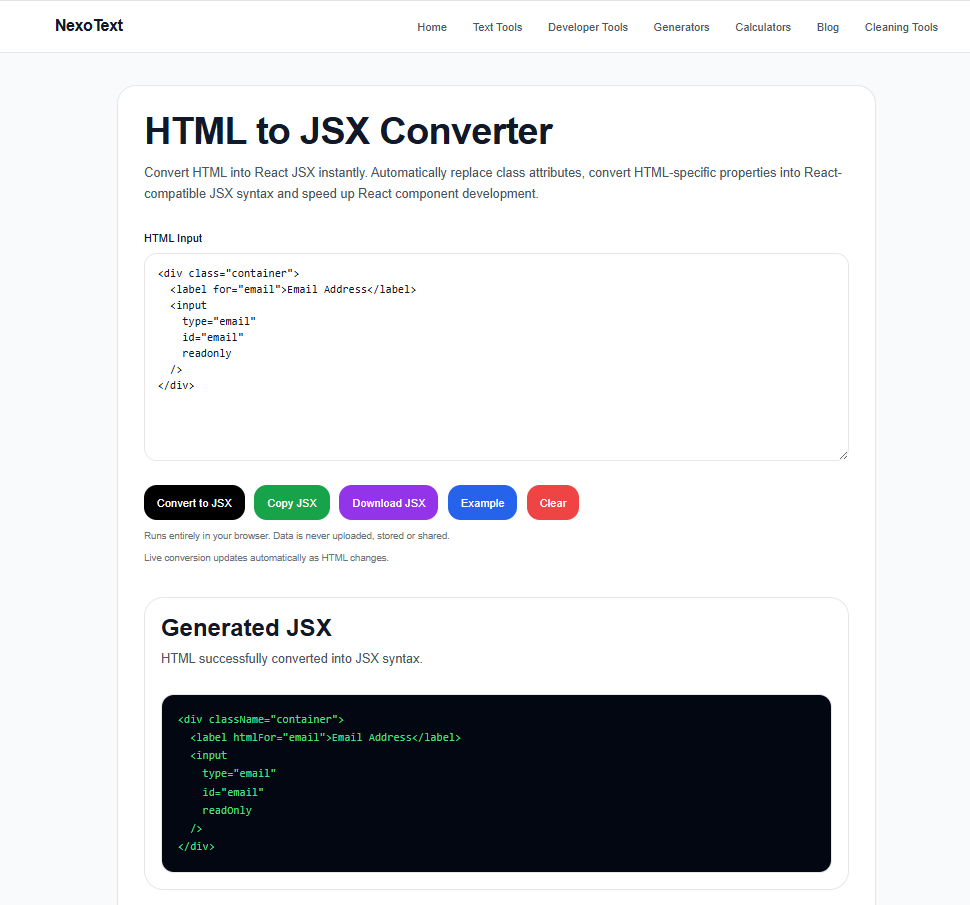
Converting HTML to React JSX using the NexoText HTML to JSX Converter.
Let's walk through a real-world example that many developers encounter when moving from a static website to React.
Imagine you have the following HTML code copied from a landing page:
<div class="hero">
  <img src="hero.jpg">
  <h1>Welcome to Our Website</h1>
  <button onclick="showMessage()">
    Get Started
  </button>
</div>
Although this code is valid HTML, React will not accept it without modification. JSX is stricter than HTML and follows JavaScript naming conventions. React requires a single parent element, properly closed tags, and camelCase attributes.
Here is the converted JSX version:
<div className="hero">
  <img src="hero.jpg" alt="Hero" />
  <h1>Welcome to Our Website</h1>
  <button onClick={showMessage}>
    Get Started
  </button>
</div>
Notice the changes:
- class becomes className
- onclick becomes onClick
- img becomes a self-closing tag
- JavaScript functions are passed using curly braces
Once you understand these patterns, HTML to JSX conversion becomes much easier and more predictable.
How Inline Styles Work in JSX
One of the biggest surprises for beginners is the way React handles inline styles.
In HTML, you might write:
<h1 style="color:red;font-size:32px">
  Hello World
</h1>
JSX does not allow styles to be written as plain strings.
Instead, styles must be written as JavaScript objects:
<h1
  style={{
    color: "red",
    fontSize: "32px",
  }}
>
  Hello World
</h1>
Notice how CSS properties change from kebab-case to camelCase. For example:
| CSS Property | JSX Style Property |
|---|---|
| font-size | fontSize |
| background-color | backgroundColor |
| margin-top | marginTop |
| border-radius | borderRadius |
This approach allows React to treat styles as JavaScript objects, making them easier to manipulate dynamically.
HTML vs JSX: Real-World Example
Let's imagine you're building a dashboard for an online business. The design team gives you an HTML snippet for a statistics card.
Original HTML:
<div class="stats-card">
  <h2>Total Visitors</h2>
  <span>15,420</span>
</div>
Converted JSX:
<div className="stats-card">
  <h2>Total Visitors</h2>
  <span>15,420</span>
</div>
The differences may look small, but across hundreds of components, manually converting HTML can become repetitive and time-consuming.
After converting a few large templates manually, it's easy to see why tools that automate the process have become popular among React developers.
Time-Saving Tip
If you regularly work with React, Next.js, or TypeScript projects, manually updating every attribute can quickly become frustrating.
Instead of converting markup line by line, you can use our HTML to JSX Converter to instantly transform HTML into React-compatible JSX.
Convert HTML String to JSX
Another common developer question is how to convert an HTML string to JSX.
This often happens when data comes from:
- CMS platforms
- Rich text editors
- External APIs
- Database content
Consider the following HTML string:
const htmlString =
  "<h1>Hello World</h1>";
In React, HTML strings cannot simply be rendered as JSX. Developers often use parsing libraries or React's rendering mechanisms depending on the use case.
Understanding this distinction is important because JSX elements and HTML strings are not the same thing.
Using Babel for HTML to JSX Conversion
You may have encountered searches such as "Babel HTML to JSX" or "HTML to JSX compiler".
Babel is a JavaScript compiler commonly used in React projects. During development, Babel transforms JSX into JavaScript that browsers can understand.
While Babel itself does not magically convert arbitrary HTML into JSX, it plays a major role in processing JSX syntax during the build process.
Understanding how Babel works helps developers appreciate why JSX can use JavaScript expressions, component syntax, and dynamic rendering features.
Common HTML to JSX Conversion Mistakes
Even experienced developers occasionally make mistakes when converting HTML to JSX. Fortunately, most of these issues are easy to identify and fix once you understand the underlying rules.
Below are some of the most common HTML to JSX conversion mistakes and how to avoid them.
| Common Mistake | Incorrect | Correct |
|---|---|---|
| Using class | class="card" | className="card" |
| Using for | for="email" | htmlFor="email" |
| Unclosed image tag | <img> | <img /> |
| Inline CSS string | style="color:red" | style={{ color: "red" }} |
| Multiple root elements | Two separate elements | Wrap inside one parent |
React components must return a single root element, and JSX requires properly closed tags and JavaScript-friendly attribute names. These are some of the most important differences between HTML and JSX.
Can VS Code Help With HTML to JSX Conversion?
Absolutely.
Many developers search for terms like HTML to JSX VS Codebecause they want to speed up the conversion process.
Modern development environments such as Visual Studio Code provide extensions, formatting tools, snippets, and code actions that make JSX development significantly easier.
While extensions can save time, it is still important to understand how HTML and JSX differ. If you rely entirely on automation without understanding the conversion rules, debugging React components becomes much harder later.
When Should You Use an HTML to JSX Converter?
Manual conversion works well for small snippets, but larger projects can contain hundreds or even thousands of lines of HTML.
Imagine migrating a traditional business website into a React or Next.js application. Updating every class attribute, fixing every self-closing tag, and adjusting inline styles manually could take hours.
This is exactly where an HTML to JSX converter becomes useful.
Instead of manually updating markup line by line, a converter can instantly generate React-compatible JSX while preserving the original structure of your layout.
Want to Save Time?
If you're working with large templates or frequently moving code into React projects, manually updating every attribute can get repetitive. Our HTML to JSX Converter handles the common conversions automatically, helping you focus on building features instead of fixing syntax.
Open HTML to JSX ConverterBest Practices for HTML to JSX Conversion
If you regularly work with React projects, following a few best practices can save a significant amount of development time.
- Keep components small and reusable.
- Use semantic HTML whenever possible.
- Always provide alt text for images.
- Use descriptive class names.
- Validate converted JSX before deployment.
- Use formatting tools such as Prettier.
- Break large layouts into smaller React components.
These practices improve readability, maintainability, and long-term project scalability.
Frequently Asked Questions
What is the difference between HTML and JSX?
JSX looks similar to HTML but follows JavaScript syntax rules. JSX requires attributes such as className and htmlFor, uses camelCase naming conventions, and requires properly closed tags.
Can I copy HTML directly into React?
Not always. Simple HTML often requires modifications before it becomes valid JSX. Common updates include changing attribute names and closing self-closing tags correctly.
Why does React use className instead of class?
React uses className because class is a reserved JavaScript keyword. When rendered, React convertsclassName into a standard HTML class attribute.
What is the fastest way to convert HTML to JSX?
For large code blocks, using a dedicated HTML to JSX converter is usually the fastest option. It can automatically update common attributes and formatting rules while reducing manual work.
Can JSX contain JavaScript?
Yes. One of the biggest advantages of JSX is that JavaScript expressions can be embedded directly inside markup using curly braces. This makes dynamic rendering much easier than traditional HTML.
Why I Built This HTML to JSX Converter
While working on React and Next.js projects, I found myself repeatedly converting HTML snippets into JSX. Simple changes such as replacing class with className or fixing self-closing tags became repetitive.
That's why I created the HTML to JSX Converter on NexoText. Instead of manually updating markup line by line, developers can paste their HTML and instantly generate clean JSX code that works in React projects.
Whether you're a student learning React or a developer migrating an existing website, the goal is to save time and reduce avoidable errors.
Who Should Use an HTML to JSX Converter?
This tool is useful for React beginners, Next.js developers, frontend engineers migrating static websites, and anyone working with HTML templates that need to be converted into reusable React components.
- React beginners learning JSX syntax
- Developers migrating HTML websites to React
- Next.js developers creating components
- Teams converting Bootstrap templates
- Students learning frontend development
Explore More Developer Tools
Looking for more React, JSON, and frontend development utilities? Explore the Developer Tools Hub to find additional developer-focused tools and resources.
Final Thoughts
Learning how to convert HTML to JSX is one of the first skills every React developer should master. Although HTML and JSX look very similar, the differences become important when building modern applications.
Understanding concepts such as className,htmlFor, self-closing tags, JavaScript expressions, and inline styling will help you avoid common React errors and write cleaner code.
Whether you're migrating a static website, building a new React project, or learning Next.js, understanding HTML to JSX conversion will make your workflow much more efficient.
If you want to save time, try the HTML to JSX Converter on Nexo Text and instantly transform HTML into React-ready JSX.